20 April 2026
Jim Rush
With supply chain attacks and CI/CD pipeline attacks occupying some of the cyber discourse lately, we decided we would take a look at how NuGet, Visual Studio and MSBuild interact and execute code before a project is even built.
Several high profile supply and CI/CD attacks have taken place recently, such as the LiteLLM attack, where the upstream Trivy scanner was compromised. Ultimately by compromising the CI/CD pipeline, the PyPI publishing credentials for LiteLLM were compromised and backdoored versions of the packages were published.
What is a CI/CD pipeline anyway?
Continuous Integration (CI) and Continuous Delivery/Deployment (CD) is a fancy way of saying that every time a developer commits code, some automatons swarm over the committed code and perform certain actions. Depending on how the pipelines are architected, this could mean anything from automatic unit tests, package updates or full deployment of an application. Sounds pretty useful? Generally, it is and it can save a lot of developer time by automating the boring bits. Having a robust and efficient deployment pipeline can allow developers to move faster and recover more quickly from failure states when deployments go wrong.
Compromising CI/CD pipelines
As you would imagine, this usefulness comes with a trade-off. Build servers and deployment pipelines require access to various sensitive data, such as package publishing credentials, database connection strings and other secret material required to run web applications. There are lots of effective ways to help mitigate issues within this process, however some configurations still allow for credential theft and potential privilege escalation. These pipelines are designed to execute code
What is NuGet anyway?
NuGet is the package manager for all things .NET, used to manage packages and libraries used by .NET developers. Several key operations include:
- Restore - Reinstall all dependencies listed in a project configuration file
- Install - Add a new package to a project
- Update - Check for newer versions of the packages
- Uninstall - Remove a package
The relationship between NuGet and MSBUILD
In 2017, NuGet was "fully integrated into MS Build", which introduced the concept of PackageReference and allowed for NuGet Restore to run as a background task, which would automatically restore projects when a project was loaded or saved.
Another feature that NuGet allows for is custom build targets and properties. The documentation states:
            In addition to the more traditional assemblies, NuGet packages may sometimes add custom build targets or
            properties to projects that consume that package. This can be achieved by adding a valid MSBuild file, in
            the form <package_id>.targets or <package_id>.props (such as
            Contoso.Utility.UsefulStuff.targets) within the build folders of the project.
Why is my package manager even executing code?
The thing about .targets files is that they "contain
items, properties, targets, and tasks".
Tasks in MSBuild can do a lot of things and are designed to be useful bits of code to run specific, well defined tasks during the build process. One in particular stands out: the exec task, which "Runs the specified program or command by using the specified arguments". Fun!
Let's see what that looks like:
        <Project>
          <Target Name="EvilTarget" BeforeTargets="Restore;CollectPackageReferences">
            <Exec Command="cmd.exe /c echo NuGet RCE PoC > %USERPROFILE%\Desktop\PWNED.txt" />
          </Target>
        </Project>
Lets analyse the file. The BeforeTargets directive tells NuGet/MSBuild
that this target should run before the specified targets, namely before NuGet Restore and
CollectPackageReferences operations - i.e early in the pipeline, before dependencies are resolved and before
package references are fully processed.
This was raised to the NuGet team as a security
issue in 2020, and their answer then was '...I believe we will break many packages, tools, etc that heavily
rely on this functionality without an alternative'.
Mark Of the Web: Visual Studio Edition
Microsoft has the concept of Mark Of The Web (MoTW), which indicates if a file has originated from the internet. There are several reasons this is applied, and MoTW allows the opening programs to perform additional inspection of the content, and provide a warning to the user if they're about to open something of dubious origin.
This largely applies to macro-supporting MS Office documents, executables and link (LNK) files. More and more, it's also applied to the concept of code workspaces, such as in VS Code - which is a reasonable security control, as Microsoft understands that the act of opening a malicious repo can frequently lead to unintended code execution.
If you're thinking, "Microsoft should prompt if I'm opening something unsafe, right?" and the answer is yes,
Visual Studio has the concept of Trust Zones. Microsoft states:
Visual Studio uses this identifier to protect your development environment from potential threats.
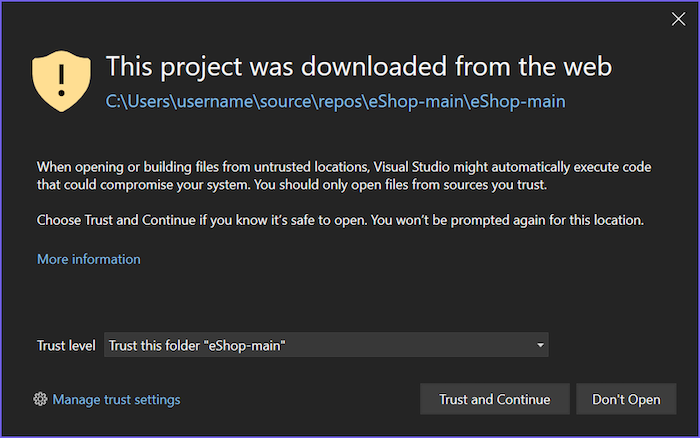
So far so good. Sure enough, if you download a file from the internet, unzip it, and painstakingly open the solution, it works! MoTW is applied, and you are protected against malware having a party on your development machine.
XXX youtube 1
As a developer, there must be an easier way to download code from the internet, and sure enough, there is. Surely the same security controls will be applied when cloning a repository, right?
XXX youtube 2
This seems like a bit of a gap in Microsoft's security controls. We should report this to them so they know about it, they seem like a reasonable organisation who have their users best interests at heart.
          Thank you again for submitting this report to the Microsoft Security Response Center (MSRC).


          After careful investigation, this report does not meet Microsoft's bar for immediate servicing. Visual Studio
          solutions and projects are designed to support multiple code execution paths, including scenarios that may
          invoke build steps or binaries as part of normal project evaluation. Opening or cloning a project is a
          user‑initiated action and may result in Visual Studio evaluating targets or executing build logic, including
          binaries that are not known in advance. Because this behavior is expected by design and occurs only as a
          direct result of user action, it does not represent a violation of an MSRC security boundary.
 Jim Rush - Principal Consultant